MeasureOD® FlawDetect · Connection

Connect the inspection system

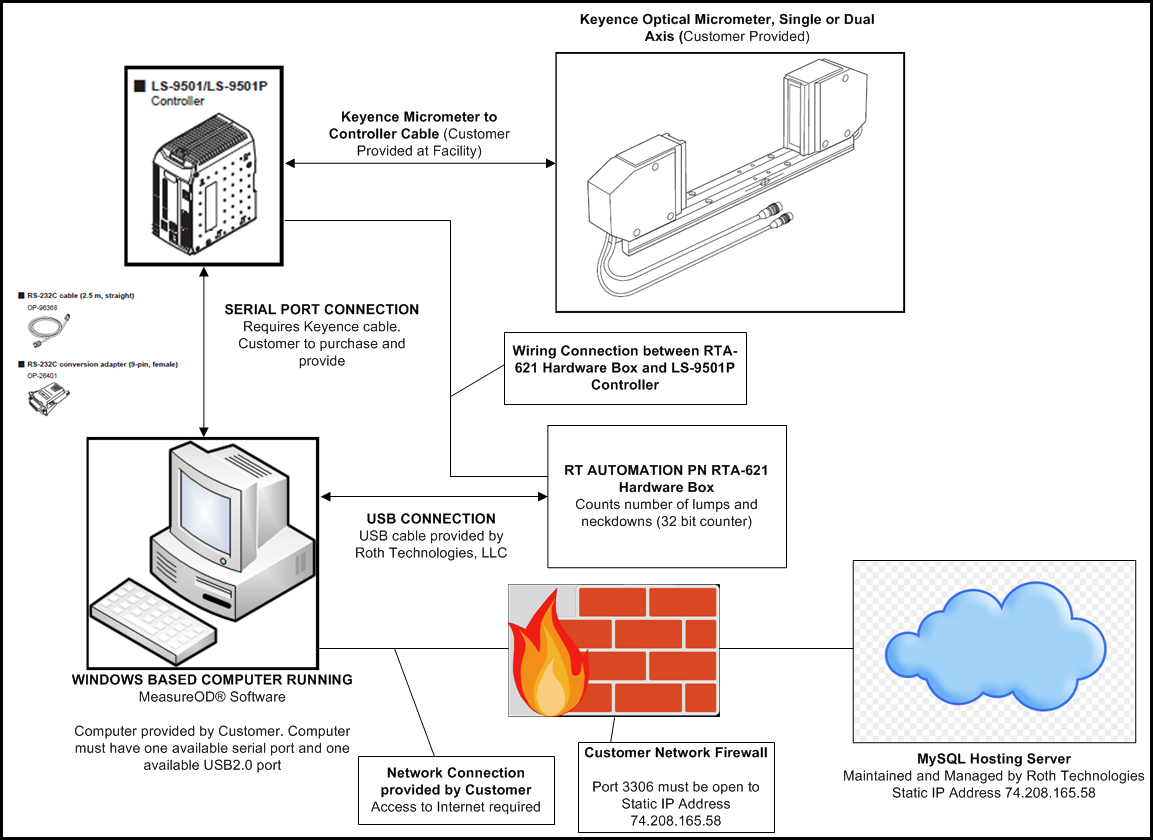
Connect the Keyence measurement hardware, Windows computer and included RTA-621 DAQ box as shown in the system diagram.

System wiring

Connection diagram

Original FlawDetect system diagram with Keyence optical head, controller, Windows PC, RTA-621 and customer firewall
Original system diagram. The LS-9501P requirement above applies to the FlawDetect DAQ box. View full size

Customer equipment

PC, optics and cables

  • Windows 10 or Windows 11 computer with an available serial port and USB 2.0 port.
  • Keyence LS-9501P controller and compatible single- or dual-axis optical micrometer head.
  • Keyence micrometer-to-controller cable and the Keyence serial cable and applicable adapter shown in the figure.

DAQ and network

Count and connect

  • Wire the included RTA-621 DAQ box to the LS-9501P as shown. The box counts lumps and neckdowns.
  • Connect the RTA-621 to the PC using the USB cable supplied by Roth Technologies.
  • Provide internet access and allow outbound TCP port 3306 to the Roth Technologies hosting server. Contact us for connection details.

Installation

Plan your setup

Installation guides ship with your order. On-site installation is available by quote.

Request an Installation Quote